How to use custom platforms
In this article, you will find how to create your own custom platform such as TikTok, where it will appear across the app.
A platform describes where a transaction came from. A book format describes the edition that sold. To create Large Print, Collector Edition, or another edition, use the custom book formats guide.
What custom platforms do
- Custom platforms let you create your own platform/source names such as TikTok
- Once created, they can be used in royalties and expenses
- They can also appear in platform filters, platform tables and platform graphs
- You can also assign a custom color so they display consistently in graph breakdowns
How to create a custom platform
-
Go to the Custom Platforms page
-
Enter the platform name you want to create, for example TikTok
-
Choose the color you want this platform to use in graph breakdowns

-
Click Create Platform
Important rules
- Platform names must be unique and contain at most 20 characters: letters, numbers, spaces, hyphens or underscores
- Duplicate names are blocked case-insensitively
- A custom platform cannot use the same name as an existing built-in platform
- A platform can only be deleted if there are no royalties or expenses using it
Where custom platforms appear
After a custom platform is created, it can appear in the following places:
- royalty creation forms
- expense creation forms
- platform filters
- platform breakdown tables
- platform tooltips
- Platform vs Total Royalties graphs
Example flow
Let's take TikTok as an example.
-
Create TikTok in the Custom Platforms page
The list below shows existing example platforms. Your new platform appears in this list after creation.
-
Go to the External Royalties/Expenses page.
-
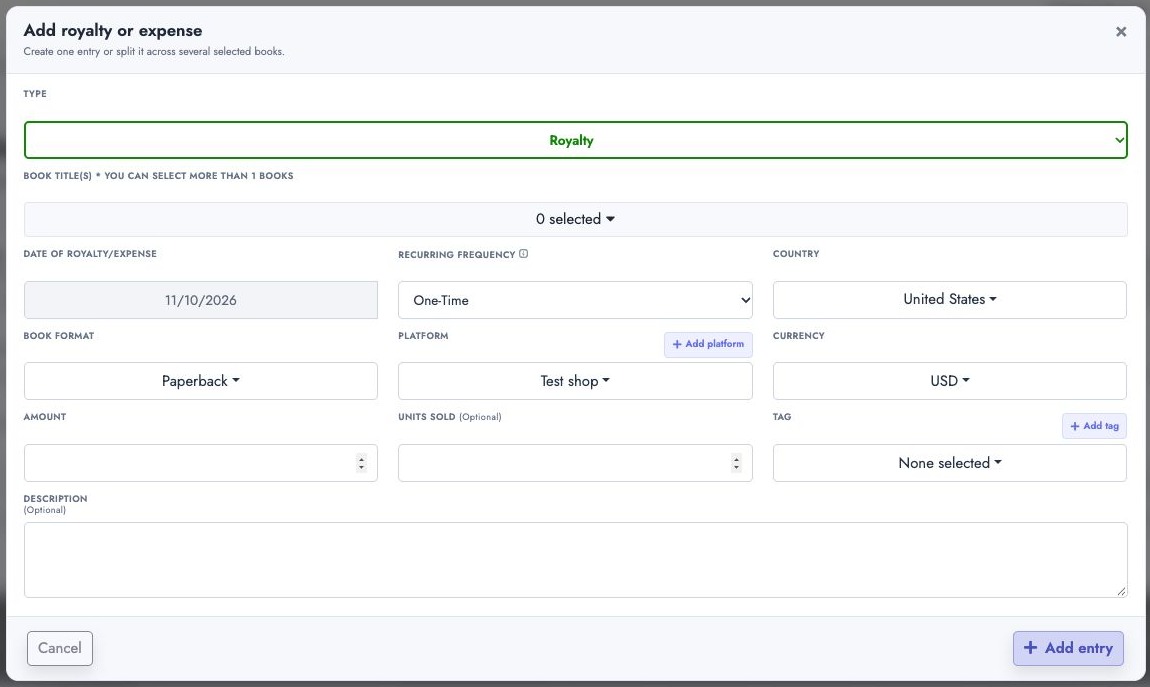
Select your custom platform as the source when creating a new entry. The screenshot uses Test shop as an example; your own platform name will appear in the same field.
-
Save the royalty or expense
-
Open pages such as Book Stats or Dashboard Lite
-
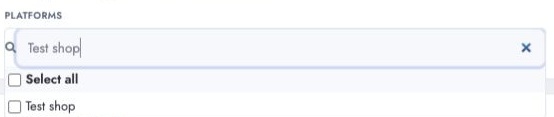
Use the platform filter and select your custom platform. The screenshot searches for Test shop
-
The data will now be filtered accordingly and TikTok can appear in platform-based tables and graphs
Editing a custom platform
- You can edit the platform name
- You can edit the platform color
- After editing, the updated platform should continue to appear in platform filters and graph breakdowns

Deleting a custom platform
- A custom platform can only be deleted if no royalties or expenses are using it
- If it is still being used, deletion should be blocked

API and Luna AI discovery
Authenticated Power Table schema responses include:
available_platforms: every exact built-in and custom platform name accepted by platform filters;custom_platforms: each custom platform's ID, name, and colour.
API clients and Luna AI can read this schema before querying, then use the
standard units, royalties, or spending measures with the platform dimension
or selected_platforms filter. Custom platforms do not need separate measure
keys.