Using Publisher Champ with Safari
You can synchronize your publishing and advertising platforms directly in Safari on your Mac, then use Publisher Champ to view your sales, royalties, advertising results and reports.
Install Publisher Champ for Safari, enable its extension and allow access to the websites you want to sync. The steps below show the complete setup.
1. Install the app in Applications
In Account Setup, choose Safari for Mac, then Download for Safari.
- Open the downloaded .dmg file.
- Drag the Publisher Champ for Safari app icon onto the Applications folder in the installer window.
- Open Applications → Publisher Champ for Safari when the copy has finished.
- You can eject the installer once the installed app is running.

Keep the app in Applications and open it from there. If you accidentally launch the installer copy after copying the app, the latest version opens the installed copy and closes the installer copy for you. You can leave the installer mounted while finishing setup. If macOS says it is in use when you eject it later, quit Safari and eject it normally.
2. Enable Publisher Champ in Safari
In the Publisher Champ app, click Open Safari Settings. Safari may take a few seconds to discover the extension on its first launch.
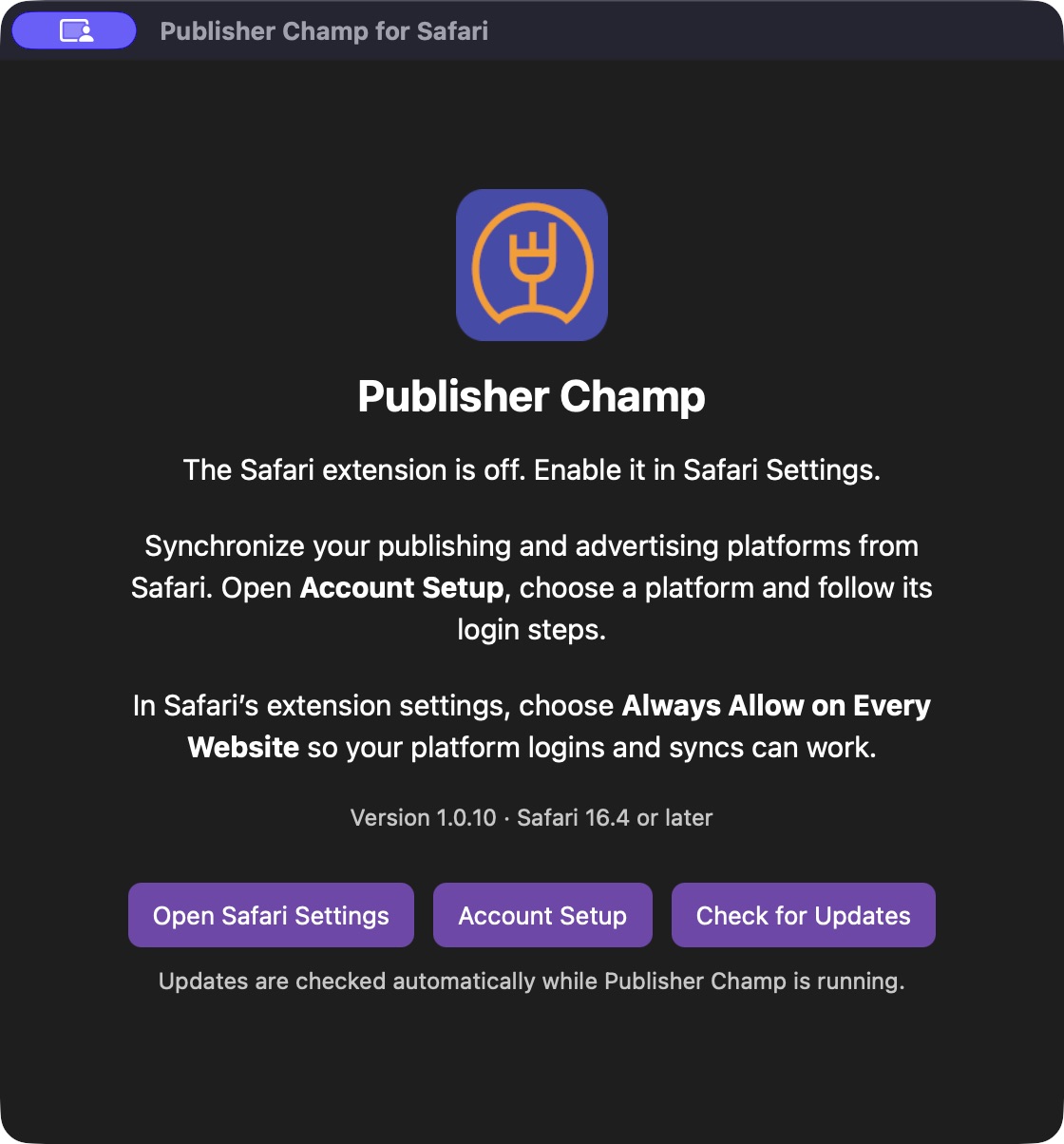
In Safari → Settings → Extensions, tick Publisher Champ for Safari. You can also reach this panel manually from Safari's Settings menu.
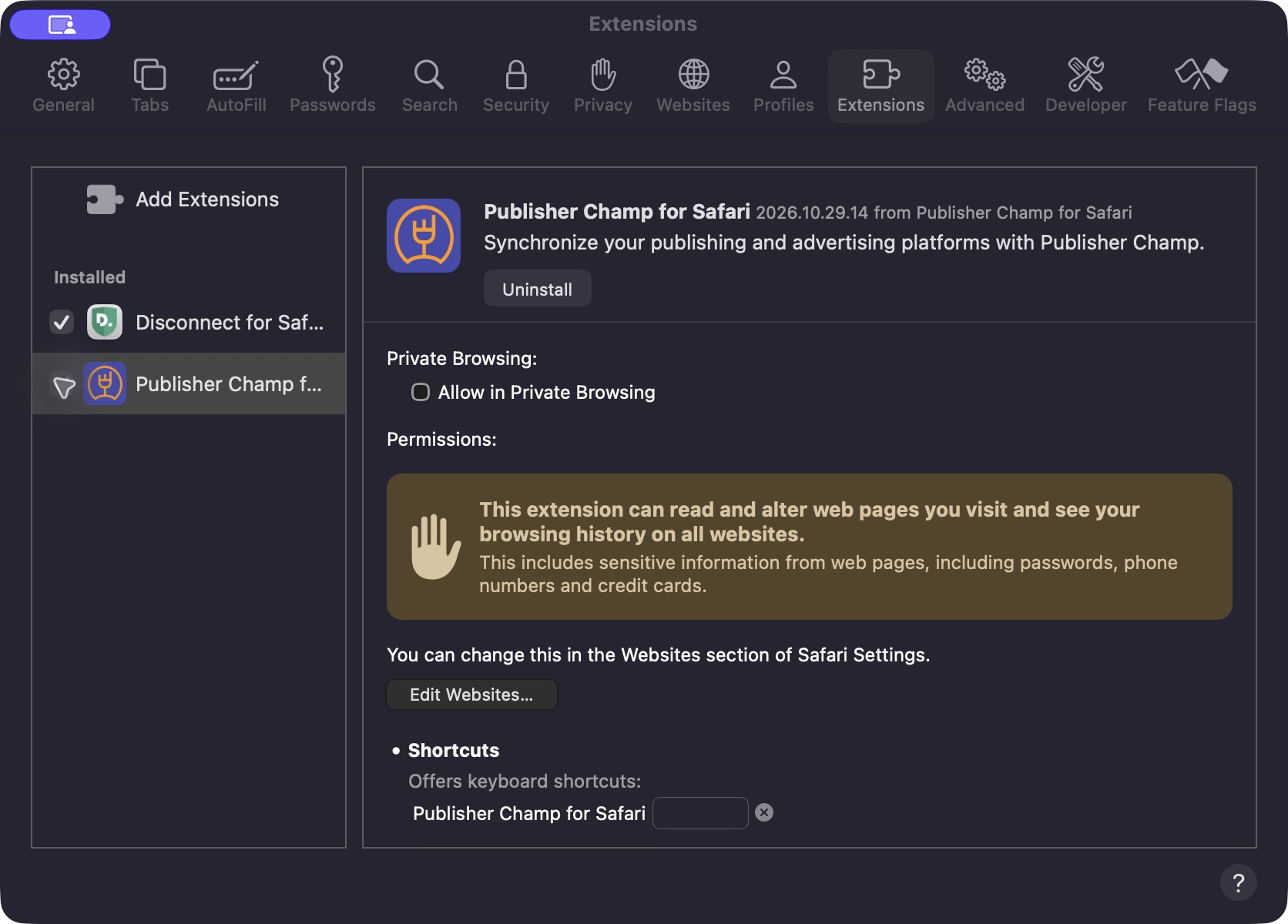
Installing the app alone does not enable syncing. Setup cannot continue until the extension is enabled and allowed on the Publisher Champ website.
If you use Safari profiles, enable the extension in the profile where you use Publisher Champ. Private Browsing has a separate extension permission; use a normal Safari window for your first setup.
3. Allow access on every website (recommended)
In Safari → Settings → Extensions → Publisher Champ for Safari, click Always Allow on Every Website…, then confirm Safari's permission prompt.
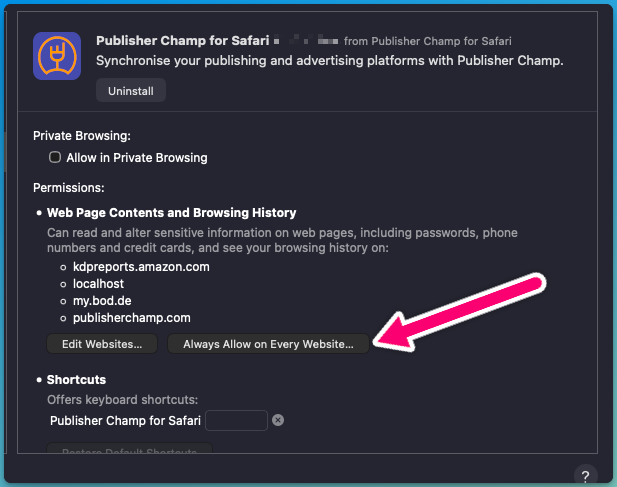
Recommended: choose Always Allow on Every Website so all your platform connections work smoothly. Publisher Champ needs access to its own website and the login, sign-in and reports websites used by your publishing platforms. Allowing every website avoids permission blocks when a platform redirects between these domains during sync.
If Safari already shows that Publisher Champ can access all websites, continue to Account Setup.
KDP uses shared Amazon sign-in cookies across amazon.com, kdp.amazon.com and kdpreports.amazon.com. The all-websites setting covers these login and reports pages, so the extension can prepare the session and detect your login.
You can review website access later using Edit Websites in the same extension settings panel.
4. Return to Account Setup and sync
Keep Account Setup open. The installation guide disappears and your platforms appear automatically when the extension is detected. If the page was already open during installation, reload it once.
- Choose a platform and select Start sync or Re-sync.
- Sign in in the new publishing-platform tab. Grant Safari website access if prompted.
- Return to Publisher Champ and follow the connection steps.
- Wait for the success confirmation. The login tab closes after a successful connection.
A successful connection starts the platform's data collection. Your dashboard may update after that processing finishes; see how often data updates.
If setup gets stuck
| What you see | What to check |
|---|---|
| Publisher Champ is missing from Safari Extensions | Check that the app is in Applications. Open the Applications copy. The latest installer app can hand over to the installed app automatically; you can leave the installer mounted while finishing setup. Give Safari a few seconds to discover it. If needed, quit Safari and open the installed app again. |
| The installation guide stays visible | Enable the extension, choose Always Allow on Every Website, then reload Account Setup. |
| Login is not detected, or Safari cannot clear the old session | In the extension settings, choose Always Allow on Every Website and confirm the prompt, then retry the connection. |
| Safari asks for permission again tomorrow | Use Always Allow on Every Website instead of a one-day permission. |
Some platform connections clear an old session before sign-in, so being asked to log in again can be part of the setup. Keep the login tab open until Publisher Champ confirms the connection.
If you still need help, contact Publisher Champ support and tell us which step you reached and which platform you are connecting. Do not send passwords or session cookies.
Common questions
Do I need to use another browser to sync?
No. The Publisher Champ Safari extension supports syncing your configured publishing and advertising platforms on Mac. Platforms that connect through their own account-linking or API flow continue to use the options shown in Account Setup.
Does this guide apply to iPhone or iPad?
This extension and installer are for Safari on Mac. For iPhone or iPad, use the mobile setup options in Account Setup.
Do I need to allow unsigned extensions?
No. The Safari download offered in Account Setup is signed and notarized. You do not need Safari's developer setting for unsigned extensions.
How do I update the Safari app?
Publisher Champ checks for updates automatically while the Mac app is running. When an update is available, follow its update prompt to install and relaunch; you do not need to download and replace the app yourself. You can also open the Mac app and choose Check for Updates. If you quit the Mac app, checks resume the next time you open it. The Safari extension continues working while the Mac app is closed. Keep the app installed in Applications.
Can I keep using Safari for my dashboards?
Yes. Use Safari for both setup and your everyday Publisher Champ dashboards, reports, charts and account management.