Fast date ranges
Switch between Today, Yesterday and This Month directly from the menu bar.
See today's, yesterday's, or this month's royalties without opening another browser tab. Publisher Champ lives quietly in your Mac menu bar and refreshes on your schedule.
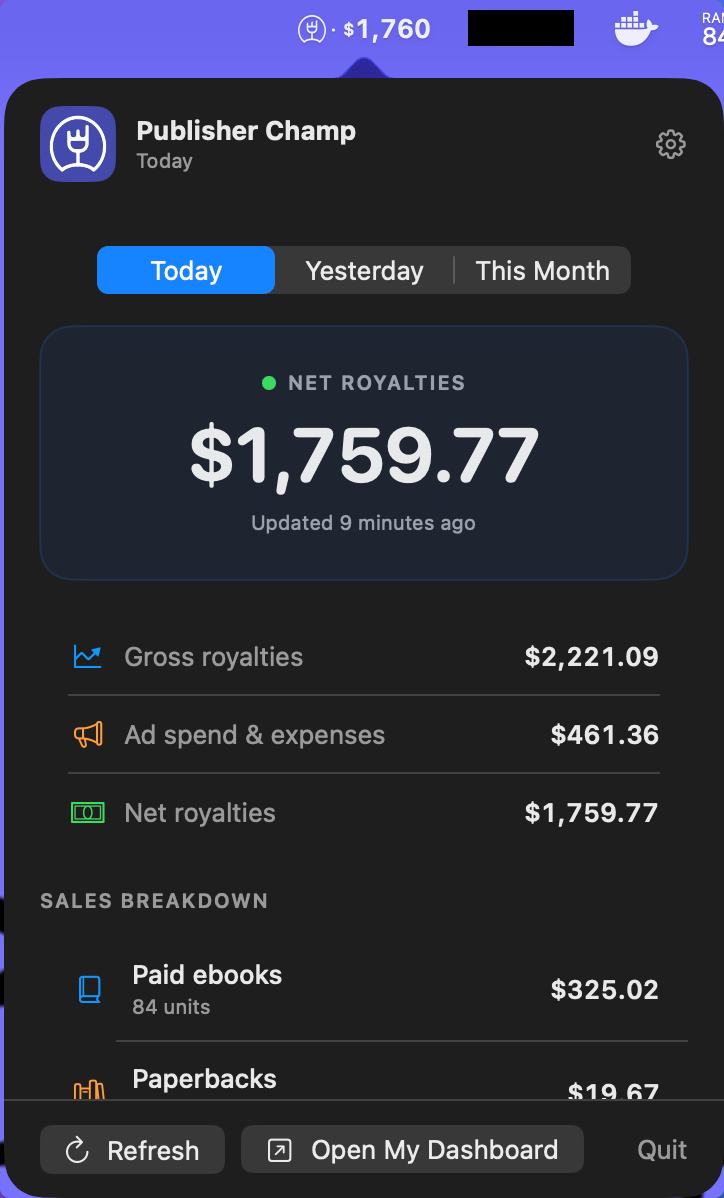
Built as a lightweight companion to your Publisher Champ dashboard—not another app demanding your attention.
Switch between Today, Yesterday and This Month directly from the menu bar.
Choose whether the headline figure shows gross royalties or profit after ad spend and expenses.
See ebooks, paperbacks, hardcovers, audio, expanded distribution, KENP and custom formats.
Refresh manually or automatically every 30 minutes, 1 hour, 2 hours or 3 hours.
Select from the Publisher Champ accounts already authorized for your API key.
Your API key stays in macOS Keychain and the app never asks for your passwords.
The app runs in your menu bar, so it does not add another permanent icon to your Dock.
Use the download button above, then open PublisherChamp.dmg from your Downloads folder.
Drag Publisher Champ into the Applications folder, eject the installer, then open the app.
The app opens Publisher Champ in your browser. Sign in, then return to the app—your API key and accounts are connected automatically.
On first launch, the app opens Publisher Champ in your browser. Sign in and approve opening the Mac app; your API key is transferred securely and stored in macOS Keychain.
No. It only uses your Publisher Champ API key to read the reporting data already available to your account.
The key proves that the Mac app is allowed to request your data. It is stored in macOS Keychain rather than in a normal preferences file.
Every 30 minutes by default. You can change this to 1, 2 or 3 hours, and you can refresh manually at any time.
The old key stops working. Open My Account → Settings → API Access, copy the replacement key, then enter it in the Mac app settings.
Quit Publisher Champ from its menu, then move Publisher Champ from Applications to the Bin. You can also remove its saved Keychain item from Keychain Access.
A focused Publisher Champ companion, built for your Mac menu bar.
Download Publisher Champ